- Greenhouse integrations help recruiters handle tasks the ATS doesn’t cover on its own. E.g., candidate sourcing, screening, interview scheduling, and background checks.
- Before choosing a tool, check what your team can do from Greenhouse, what information comes back, and what still requires another platform. Setup, pricing, and plan restrictions matter, too.
- Choose Willo when you need to screen candidates before live interviews. Recruiters can send invitations, track completion in Greenhouse, and open submitted responses to help decide who moves forward.
If you’re looking at Greenhouse integrations, you’ve likely hit the same wall many TA teams do. Candidate records live in the ATS. But much of the hiring work happens in other tools, so your team spends time switching tabs and manually updating statuses.
Integrations can help, but not all at the same level. Some sync both ways, so recruiters can trigger actions, see candidate status, and review interview scores without leaving Greenhouse. Others just launch a process in Greenhouse and leave the rest to the connected tool. That difference decides how much tool-toggling and follow-up your team still has to do.
This guide compares eight Greenhouse integrations across four hiring stages:
- Candidate screening
- Talent sourcing
- Interview scheduling
- Background checks.
For each one, we cover what the tool does and how the connection works. We also explain what candidate data moves between the two systems, and tasks recruiters still have to manage elsewhere.
Here’s what you’ll learn:
- Which tool fits each hiring-stage gap.
- What to check about the Greenhouse handoff before updating your hiring stack.
- How the screening and assessment options differ.
The 8 best Greenhouse integrations by use case
Best Greenhouse integrations for candidate screening and assessment
Willo: for structured, high-volume candidate screening
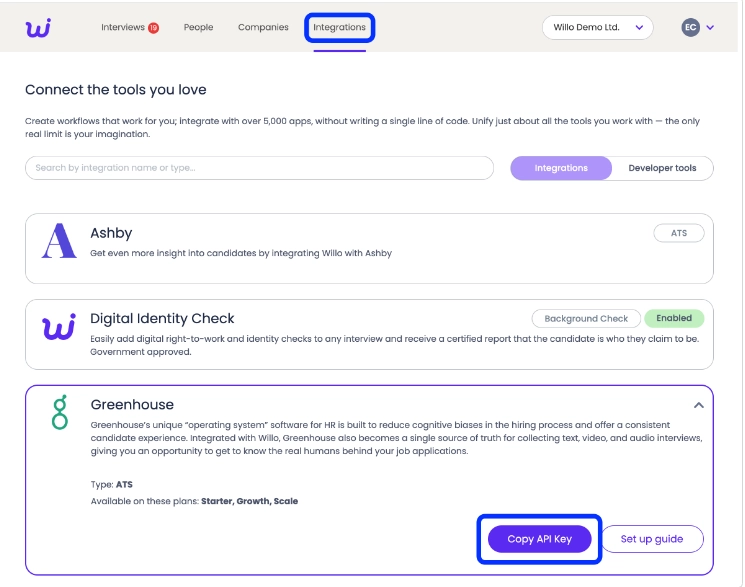
Willo is a candidate screening platform that helps high-volume hiring teams screen at scale and shortlist with confidence. As an official Greenhouse ATS interviewing partner, Willo connects candidate screening to your existing hiring workflow. You can send invitations and track completion in Greenhouse, then open responses in Willo to review candidates and build your shortlist.
For teams handling large applicant pools, Willo helps reduce screening and administration time. For example, EDF cut recruiter admin time by 50% during a recruiting cycle involving more than 17,000 potential applicants. At Travelxp, screening time dropped from 45 minutes to 15 minutes per candidate.
Here’s how it works with Greenhouse.
How Willo improves candidate screening in Greenhouse
Say you're hiring for a role with hundreds of applicants through Greenhouse. Reviewing every CV is one thing. Finding time to speak with everyone who looks promising is another.
Willo provides a way to assess those candidates before committing to live interviews, without managing invitations and screening progress separately.
TA teams can:
- Invite candidates from Greenhouse: Add Willo to your interview plan and send candidates an invitation. Willo delivers the interview instructions by email and SMS.
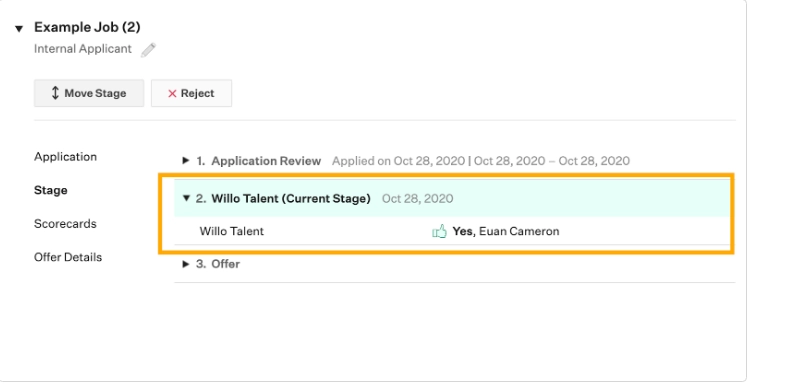
- Track their progress: You can see interview completion status in Greenhouse, so you know who's responded and who's still outstanding. In the screenshot below, the Willo stage sits between Application Review and Offer in the candidate’s Greenhouse record.
- Review their answers: Once candidates finish, Greenhouse provides a link to their responses in Willo. You can review what they said before deciding who moves forward.
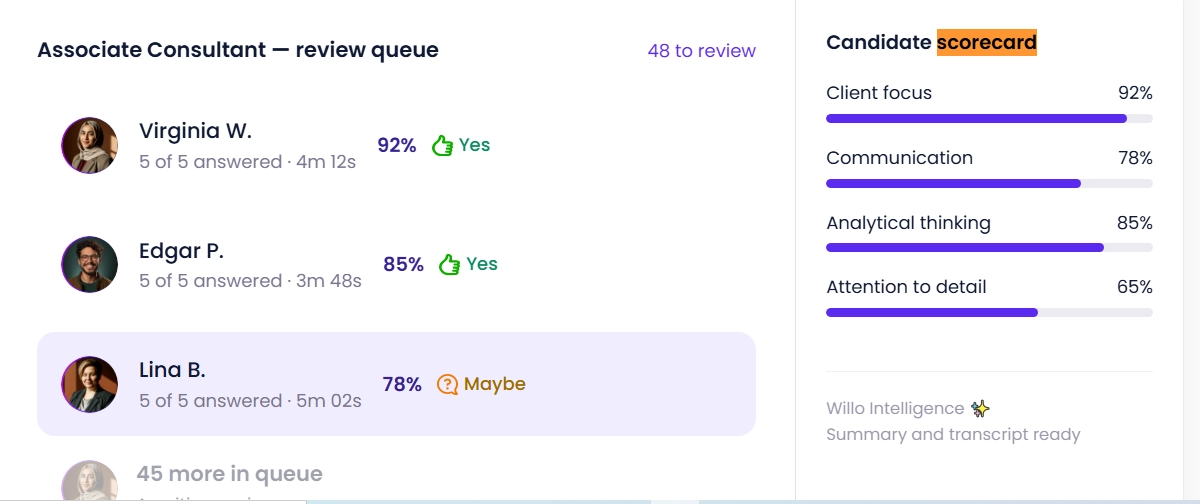
Willo also offers custom scorecards and AI-powered insights to evaluate candidates against predefined hiring criteria. Human recruiters then make the final decision. The review queue below shows response completion alongside a candidate scorecard. You can see separate ratings for Client focus, Communication, Analytical thinking, and Attention to detail.
When reviewing candidates in Willo, you can access:
- Candidates' original responses
- Summaries of their answers
- Insights scores and the evidence behind them
Then view the fuller responses and in-depth insights (summaries, full scorecards, transcripts) in Willo.
Beyond Greenhouse, Willo connects with more than 5,000 tools through its native, API, and Zapier integration options. This lets recruiters connect screening with other parts of their hiring process without replacing the tools they already use.
User reviews
Pros
- More than just CVs: Collect video, audio, and text responses. Candidates can also upload work samples and portfolios. This gives you more evidence to assess their suitability.
- Less screening admin: Send invitations and track candidate progress in Greenhouse. Spend less time on manual follow-ups, even with large applicant pools.
- Consistent candidate evaluations: Use custom scorecards to assess candidates against the same criteria. AI-powered Insights adds scores and supporting evidence. Your team makes the final decisions.
- Works with your existing tools: Willo connects directly with Greenhouse. It also supports connections to more than 5,000 other tools, so you can keep your existing hiring software.
- Flexible for candidates: Applicants can complete interviews on mobile or desktop. Willo supports more than 18 languages and offers 24/7 assistance.
Cons
- No live interviews: Willo focuses on asynchronous screening. You'll need another tool for live interviews.
- Full reviews happen outside Greenhouse: You can track interview status in Greenhouse. But you'll need to open Willo to review complete responses, scorecards, and Insights.
Pricing
Willo has two main plans:
- Lite: $59 per live role, suited to teams that hire occasionally.
- Enterprise: Starts at $3,799 per year for teams with ongoing hiring needs.
Verified NGOs qualify for a 50% discount. A 14-day free trial is available for teams that want to try Willo before subscribing. See Willo’s pricing page for more details.
Why teams choose it: Willo adds structured candidate screening to Greenhouse, so recruiters can assess more applicants before live interviews.
TestGorilla: for a broad library of skills assessments
TestGorilla helps talent teams test candidates’ skills before bringing them in for an interview. Its assessment library covers cognitive ability, programming, language proficiency, and other job-related skills. Employers can also add one-way video questions to hear candidates explain their experience and approach to a problem.
The Greenhouse integration connects TestGorilla’s assessments to the hiring workflow in the ATS. In the interview kit below, use the Test Name dropdown to choose the assessment you want to send.
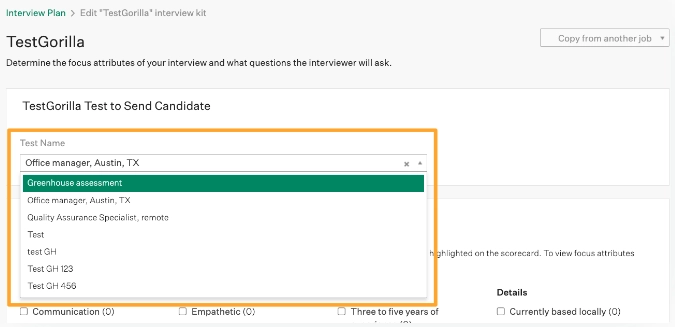
How TestGorilla works with Greenhouse
After integration, teams can:
- Add TestGorilla to a job’s interview plan in Greenhouse.
- Send assessment invitations from a candidate’s record.
- Check assessment status and results in Greenhouse.
- Open the full report in TestGorilla to review individual test scores and performance.
Results sync approximately every 30 minutes, so the latest scores may take a while to appear.
TestGorilla and Willo serve different screening needs. TestGorilla focuses on skills assessments, while Willo collects structured responses to role-specific questions.
When recruiters need to measure proficiency in a particular skill, TestGorilla’s assessment library provides plenty of options. But if the goal is for candidates to answer questions tailored to the role, Willo’s structured interviews may be a better fit.
User reviews
Pros
- Sends skills assessment invitations directly from Greenhouse.
- Shows assessment status and results in Greenhouse candidate records.
- Offers a large library of ready-made tests for technical, cognitive, and job-specific skills.
Cons
- Requires the Plus plan to access the Greenhouse integration.
- Full assessment reports must be reviewed in TestGorilla.
- Results may take around 30 minutes to sync with Greenhouse.
Pricing
TestGorilla offers a free plan, Core from $77/month, and Plus from $520/month, billed annually. The Greenhouse integration requires Plus, starting at $6,240/year.
Why teams choose it: Its broad range of ready-made skills assessments helps Greenhouse users evaluate candidates against role-specific requirements.
Best Greenhouse integrations for talent sourcing
Findem: for rediscovering and enriching existing talent
Findem works well for searching external talent pools and rediscovering people who applied for previous roles. It searches external talent sources and updates existing Greenhouse profiles with contact information, work history, social links, and resumes. This way, recruiters can revisit promising applicants when a suitable role opens up. Open Admin > Integrations to check the connection; the screenshot below shows Greenhouse marked Active.
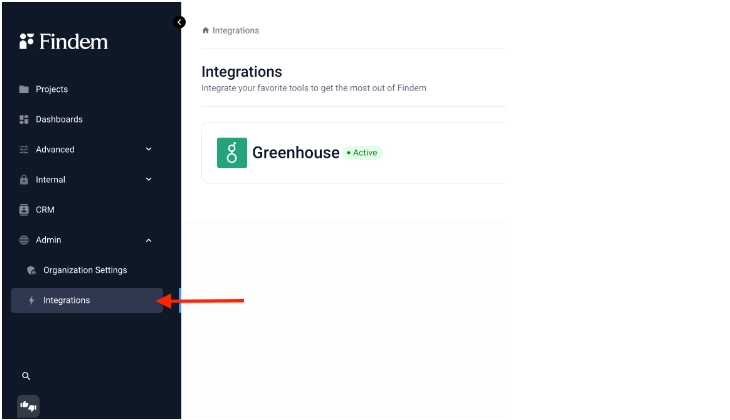
How Findem works with Greenhouse
When TA teams connect Findem’s sourcing and enrichment tools to Greenhouse, they can bring candidate details back into the ATS automatically. No manual data entry needed.
The integration supports:
- Candidate enrichment: Add contact details, work history, social links, and other information to existing profiles.
- Candidate records: Send resumes, attachments, tags, and notes to Greenhouse.
- Outreach activity: View supported outreach details in the candidate record.
Handle sourcing and outreach in Findem, while Greenhouse remains the main workspace for candidate records and hiring stages.
User reviews
Pros
- Searches existing Greenhouse records to rediscover candidates for new roles.
- Enriches Greenhouse profiles with work history, contact details, and other professional information.
- Combines external talent searches with candidates already in your ATS.
Cons
- Advanced sourcing and outreach still happen outside Greenhouse.
- Enriched candidate information may need manual verification.
- Requires setup to connect and synchronize candidate data correctly.
Pricing
Findem uses custom pricing based on contract terms and usage. To get a quote for Greenhouse integration and sourcing features, contact Findem.
Why teams choose it: Findem combines talent discovery and candidate enrichment to help Greenhouse users build stronger talent pipelines and fill hard-to-fill roles.
SeekOut: for hard-to-find talent across external sources
When a role calls for technical skills or candidates from underrepresented talent pools, SeekOut helps recruiters look beyond incoming applications. It also helps teams rediscover candidates already in Greenhouse, so they can consider past applicants for new openings. The search view below places keyword and location filters beside candidate profiles. You can see experience, education, and skills in the profile itself.
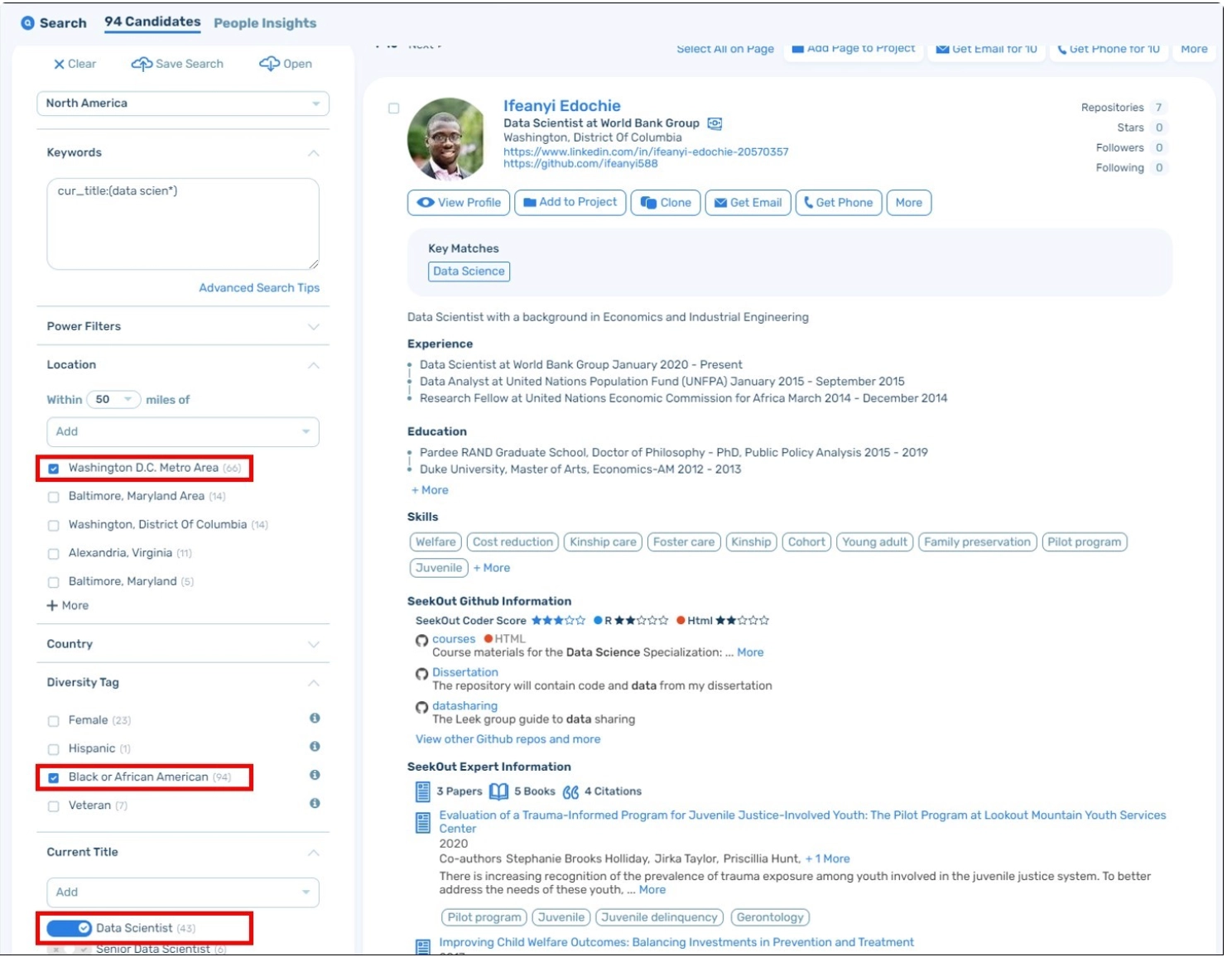
How SeekOut works with Greenhouse
- Search existing candidates: Find past applicants in SeekOut using keywords, Boolean search, and filters for skills, experience, application status, and hiring stage.
- Enrich profiles: Match Greenhouse records to SeekOut profiles and add details such as social links, work history, and education for better search results.
- Add new prospects: Export sourced candidates to Greenhouse with contact information and work history, either as prospects or against a specific job.
While Findem focuses on enriching profiles and resurfacing eligible past candidates, SeekOut is built for finding hard-to-reach candidates across external talent sources. The better fit depends on two things. Whether you need to find new talent or just want to get more value from the candidates already in your database.
User reviews
Pros
- Exports sourced candidates into Greenhouse for pipeline management.
- Offers advanced filters for finding technical and hard-to-reach talent.
- Helps recruiters expand their searches beyond existing ATS records.
Cons
- Greenhouse integration requires the custom-priced Sourcing + Integration plan.
- Advanced searches and candidate discovery happen in SeekOut.
- Requires some experience with Boolean searches and detailed filters.
Pricing
SeekOut Recruit Core costs $149 per month when billed annually. However, the Greenhouse integration is included in the Sourcing + Integration plan, which uses custom pricing based on team size.
Why teams choose it: Its advanced search capabilities help recruiters find niche talent and build stronger pipelines for hard-to-fill roles.
Best Greenhouse integrations for interview scheduling
Calendly: for candidate self-scheduling of simpler interviews
For phone screens and one-to-one interviews, Calendly lets candidates book a time directly from a scheduling link sent through Greenhouse. This in turn cuts out the usual email back-and-forth. It suits early hiring stages when recruiters need to book individual meetings quickly. In the candidate record below, Schedule with Calendly appears within the current interview stage.
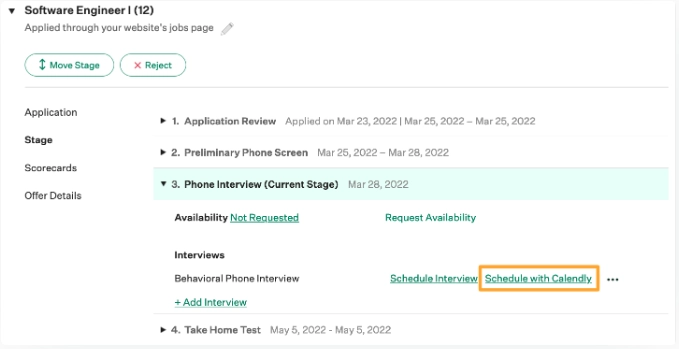
How Calendly works with Greenhouse
Recruiters can send scheduling links from a candidate’s interview stage in Greenhouse. The process works like this:
- Send an invitation: Select Schedule with Calendly in Greenhouse and include the scheduling link in the email.
- Let candidates book: Candidates pick an available time or reschedule if their plans change.
- Keep the record updated: The booked interview appears on the candidate’s Greenhouse profile, and the interviewer gets an email notification.
Calendly’s Greenhouse integration supports one-to-one interviews, not panel interviews, stages with multiple interviews, or multiple Calendly events.
User reviews
Pros
- Allows candidates to choose available interview times without email exchanges.
- Offers a Greenhouse integration on its Free plan.
- Supports interview cancellations and rescheduling.
Cons
- Greenhouse integration doesn't support panel or group interview scheduling.
- Each recruiter must connect their Calendly account separately.
- Doesn't handle complex, multi-stage interview coordination.
Pricing
Calendly has a free plan, while paid plans start at $10 per seat/month, billed annually. The Greenhouse integration works with all Calendly plans, including Free.
Why teams choose it: Calendly simplifies interview booking and cuts down on email back-and-forth, especially during early-stage hiring.
GoodTime: for complex interview coordination
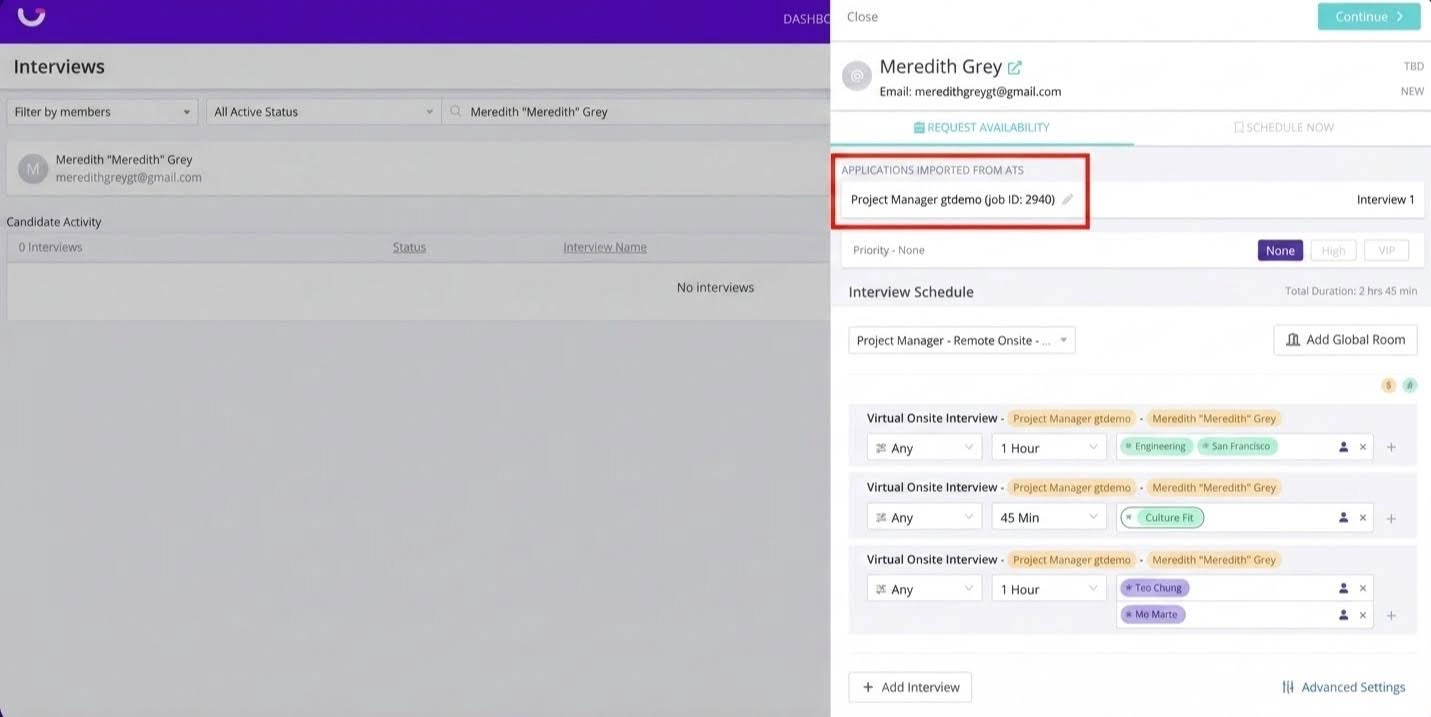
GoodTime handles scheduling for recruiting teams coordinating panel interviews, multiple interviewers, and high hiring volume. Its two-way Greenhouse integration syncs candidate and interview details between both platforms. In the scheduling view below, Applications imported from ATS identifies the job. Interview slots, durations, and interviewer assignments appear underneath.
How GoodTime works with Greenhouse
The GoodTime/Greenhouse integration lets teams move from candidate records to scheduling without re-entering interview details. GoodTime pulls in candidate and job information from Greenhouse, then sends scheduled interview details back to the ATS.
The connection supports:
- Interview planning: Use candidate and job details from Greenhouse to coordinate interviews in GoodTime.
- Calendar coordination: Match interviewer availability across calendars and find suitable times for candidates.
- Interview updates: Keep scheduled interview details visible in Greenhouse as plans change.
Unlike Calendly, which works well for one-to-one interviews, GoodTime is built for more involved scheduling. This includes panel interviews, multiple interviewer calendars, and high-volume hiring.
User reviews
Pros
- Coordinates panel interviews across multiple calendars and interviewers.
- Uses automation to reduce manual scheduling and interviewer coordination.
- Provides scheduling analytics to identify delays and interviewer workload issues.
Cons
- Initial Greenhouse integration setup may require administrator support.
- Advanced scheduling activities still happen in GoodTime.
- Can be more complex than necessary for teams with simple interview schedules.
Pricing
GoodTime uses custom pricing based on annual candidate volume, not user seats. All core features and ATS integrations, including Greenhouse’s two-way sync, are included.
Why teams choose it: GoodTime coordinates interviewers, calendars, and candidate availability in one workflow, making complex hiring schedules easier to manage.
Best Greenhouse integrations for background checks
Checkr: for initiating and following checks within the hiring workflow
Checkr handles background screening for employers before a hiring decision. Its Greenhouse integration lets you order checks and track their status from candidate profiles in Greenhouse, then open full reports in Checkr.
How Checkr works with Greenhouse
TA teams can order a background check from a candidate’s Greenhouse profile using a screening package already set up in Checkr. The candidate then receives an email from Checkr with a link to provide the required information and consent to the check.
The integration supports three main steps:
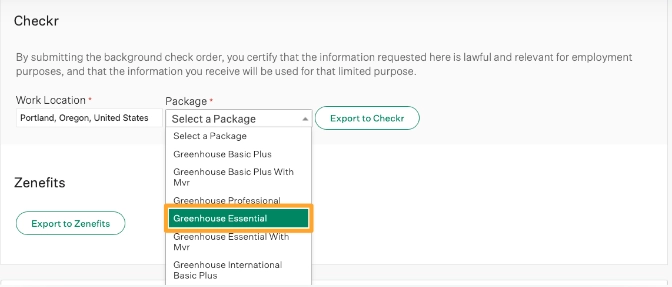
- Order a check: Select the screening package and submit the request from Greenhouse. The screenshot below shows the Package dropdown beside the Export to Checkr button.
- Collect candidate details: Checkr contacts the candidate to complete the required forms and authorization.
- Review progress and reports: Check status appears in Greenhouse, where you can open the full report in Checkr.
User reviews
Pros
- Launches background checks directly from Greenhouse candidate profiles.
- Displays background-check status in Greenhouse.
- Offers multiple screening packages, including criminal and employment checks.
Cons
- Full background-check reports must be opened in Checkr.
- Additional court and third-party fees may increase screening costs.
- Available checks and processing times vary by location.
Pricing
Checkr charges per background check, starting at $29.99/report. Pricing varies by package and additional fees. Check with Checkr to confirm which plans include the Greenhouse integration.
Why teams choose it: Checkr makes pre-employment screening easier to manage, with background check ordering and report access built into the Greenhouse workflow.
HireRight: for broader screening programs and global needs
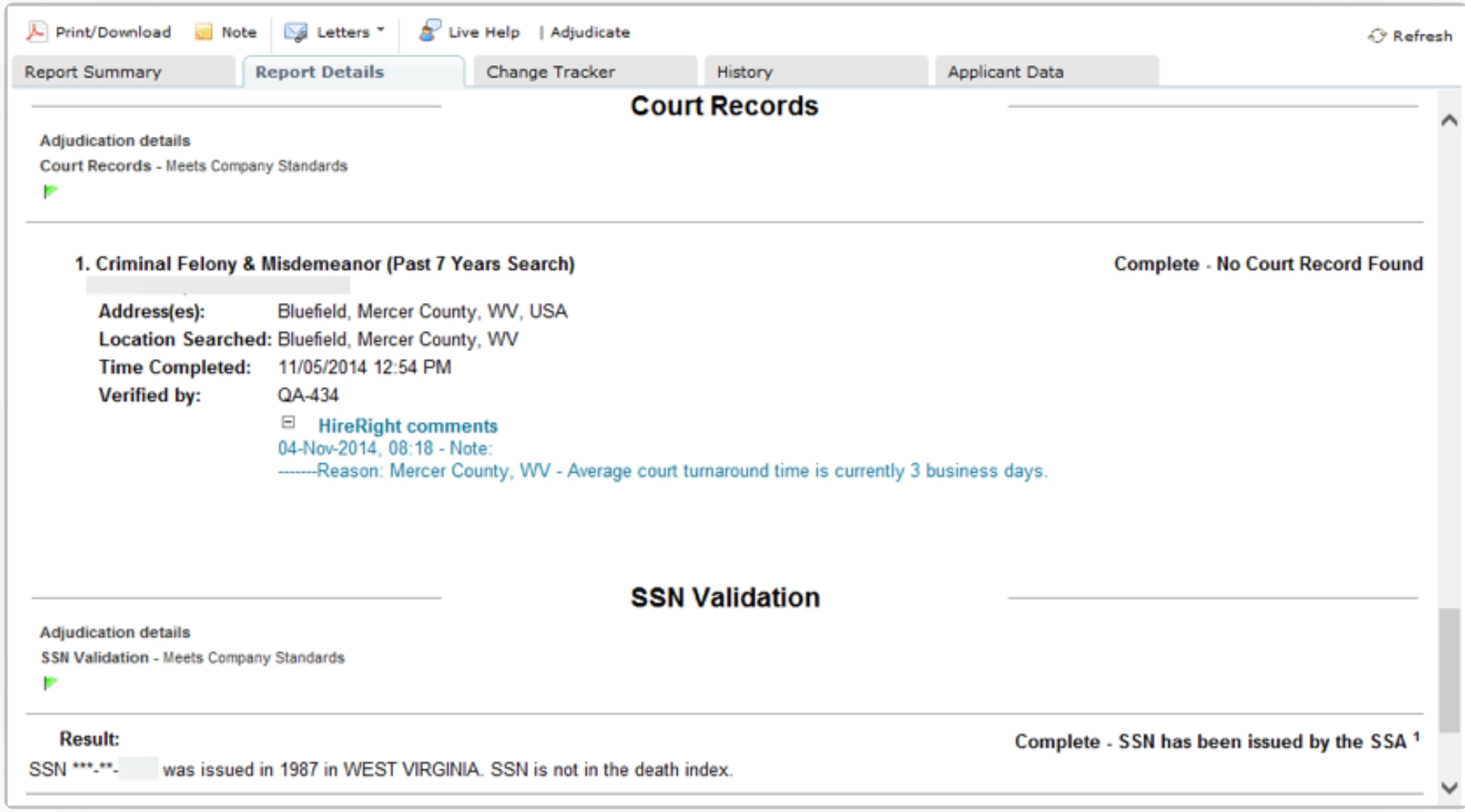
HireRight integrates with Greenhouse to help hiring teams manage background checks. It supports employment and education verification, drug testing, and health screening, making it ideal for two main scenarios. Teams with broader screening needs or roles open to cross-border hiring. The example report below shows Court Records and SSN Validation as separate sections, each with its own status and supporting details.
How HireRight works with Greenhouse
Start a background check from a candidate’s Greenhouse profile, then complete the order in HireRight. The integration lets recruiters:
- Order checks: Select Export to HireRight on the candidate’s profile and complete the order details in HireRight.
- Track progress: Select HireRight Report from the Greenhouse profile to check the status.
- Review results: Open the report in HireRight to see the screening results and any discrepancies between the candidate’s information and their Greenhouse profile.
HireRight’s Greenhouse integration supports screening across North America, EMEA, APAC, and South America. This enables hiring across several regions while managing different requirements through one provider.
User reviews
Pros
- Supports international background screening across multiple countries.
- Offers employment, education, criminal, and other verification services.
- Displays screening progress in Greenhouse while HireRight handles verification.
Cons
- Full screening reports and some follow-up tasks remain in HireRight.
- Integration setup may require coordination with HireRight's team.
- International screening requirements can complicate the process.
Pricing
HireRight uses quote-based pricing; contact the team directly for a quote that covers Greenhouse integration.
Why teams choose it: HireRight supports more complex screening needs, from employment verification to drug testing and health screening.
How to choose the right Greenhouse integration for your hiring process
Start with the work your team needs help with, then check whether the integration supports that workflow. A useful connection should make the next step easier for recruiters and candidates.
Identify the gap and match the tool
Where does your hiring process slow down, or leave your team without the information it needs?
- Struggling to find suitable candidates? Consider sourcing integrations that help you search external talent pools or revisit past applicants.
- Need more evidence before deciding who progresses? Look at screening and assessment tools that help you evaluate candidates against role-specific criteria.
- Spending too much time coordinating interviews? Compare scheduling tools based on whether you need simple self-booking or more complex panel coordination.
- Chasing background-check updates? Look for a connection that brings check requests and progress updates into your hiring workflow.
You may need more than one integration. Give each a clear job, and check where its capabilities overlap with tools you already use.
Check the practical requirements
Once you’ve identified suitable options, compare how each connection would work for your team:
- Actions and information: Can you send invitations, request checks, or schedule interviews from Greenhouse? Which statuses and results appear in the candidate record, and which require opening the connected tool?
- Setup and maintenance: Which permissions, vendor support, or developer resources are needed? Who will maintain the connection?
- Candidate experience and coverage: What must candidates do to complete the process? Does the tool support the locations where you hire?
- Cost and plan restrictions: Does your subscription include the Greenhouse integration? Check for additional charges and usage limits.
Ask the vendor to demonstrate the handoff from the candidate’s Greenhouse record through to the completed response, scheduled interview, or report. That gives you a concrete way to judge whether the connection fits your process.