- AI-written job descriptions sound generic because vague inputs leave too much room for familiar phrases and assumed responsibilities.
- Defining the job clearly ensures that your draft reflects the actual work, expected outcomes, and essential skills.
- You should also guide the AI generator with examples of your company’s voice and instructions on what to avoid. That helps keep the language specific and prevents invented details.
Writing a job description from scratch looks simple until you actually have to do it.
You need to explain the role, list the responsibilities, describe the ideal candidate, and make the company sound appealing.
You also need to make it specific enough that it doesn't read like every other job posting online. No wonder recruiters are turning to AI.
A good prompt can turn a blank page into a usable draft in seconds. The problem is what happens when that draft starts sounding like every other AI-generated job posting.
Candidates are noticing.
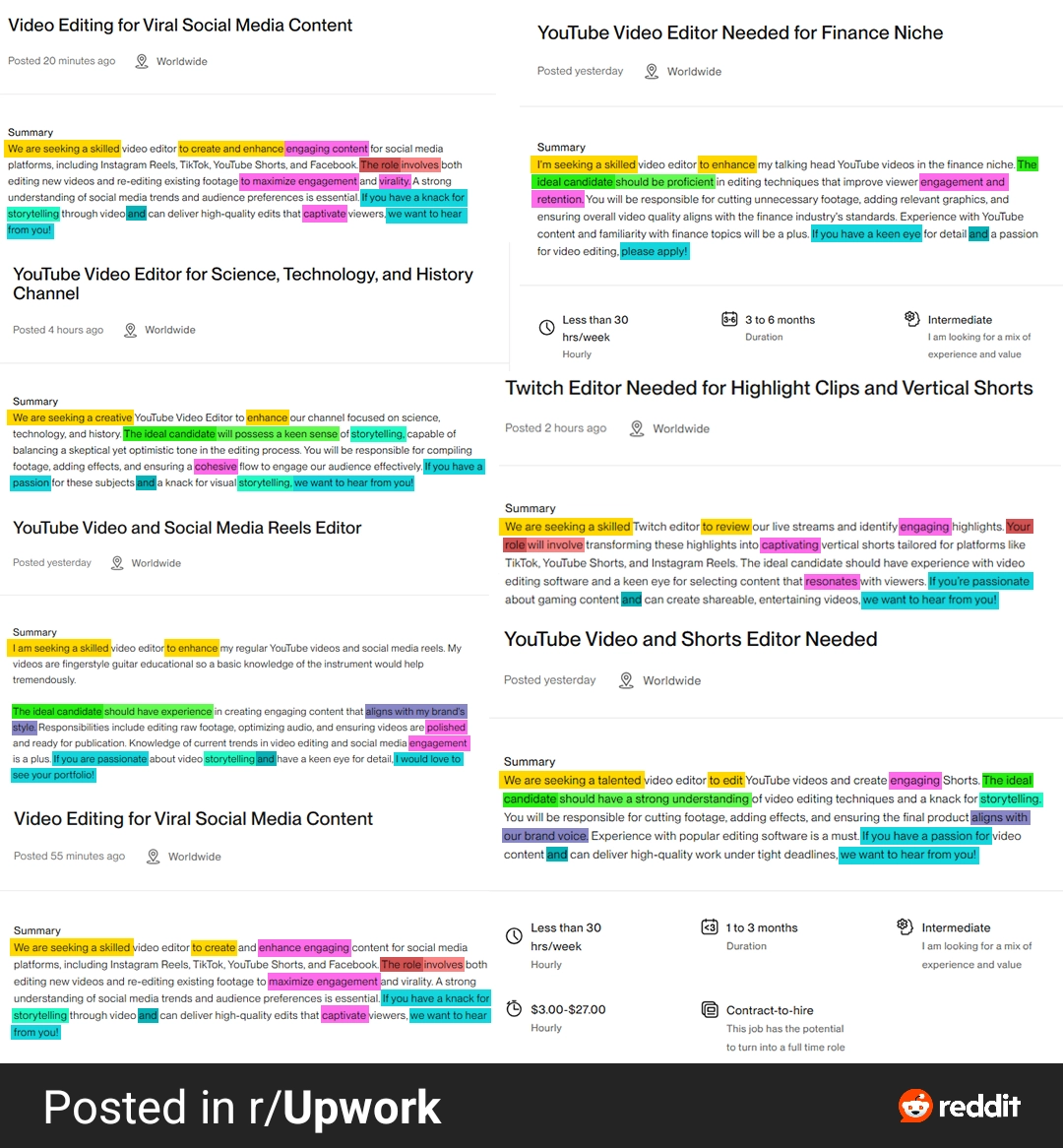
On Reddit, one r/Upwork user described skipping job posts that open with the familiar “We are seeking a talented individual” formula because it immediately signals that the client probably used AI.
The issue isn't that candidates necessarily hate AI. It's that generic AI output is easy to recognize, and companies writing job descriptions with AI often make it harder for candidates to understand what the job actually involves.
This has been a long-standing problem. In 2017, Allegis Group reported a gap between hiring managers' and candidates' views of job description clarity: 72% of hiring managers consider their descriptions clear, compared with just 36% of candidates. Monster's 2026 Job Description Report found that 78% of workers would abandon a vague job posting. You can use AI to write a job description faster and still leave candidates unclear about what the job actually involves.
The fix isn't to stop using AI. With better inputs, stronger instructions, and enough human context, you can make the draft specific to the role and appealing to candidates.
This guide covers how to use AI to write a clearer, more useful job description, and how to screen the candidates it attracts.
Why AI-Generated Job Descriptions Sound the Same
AI can write a job description in seconds. Just give it a role, a few responsibilities, and some company information, and you’ll usually get a polished-looking draft almost immediately.
The problem is that “polished” doesn't always mean specific.
Tools like ChatGPT and AI job description generators learn from huge amounts of existing language. When you give them little context, they have to fill the gaps themselves. That often means reaching for phrases and structures that appear frequently in other AI-assisted job postings.
This results in a job description that sounds professional but could belong to almost any company (Garbage in, garbage out).
As the annotated image below shows, candidates are starting to recognize the pattern. In one r/Upwork discussion, a thread called out recurring AI-style language such as “Captivate,” “Compelling,” “Engagement,” “Viral,” “Retention,” and “Resonates.”
That doesn't mean you should stop using AI to write job descriptions. It means you shouldn't treat the first draft as a finished copy.
The quality of the output depends heavily on the quality of the information you give the tool. The more specific you are about the role, responsibilities, and expectations, the less room AI has to fall back on generic language.
And there’s another place where specificity matters: the questions you ask candidates.
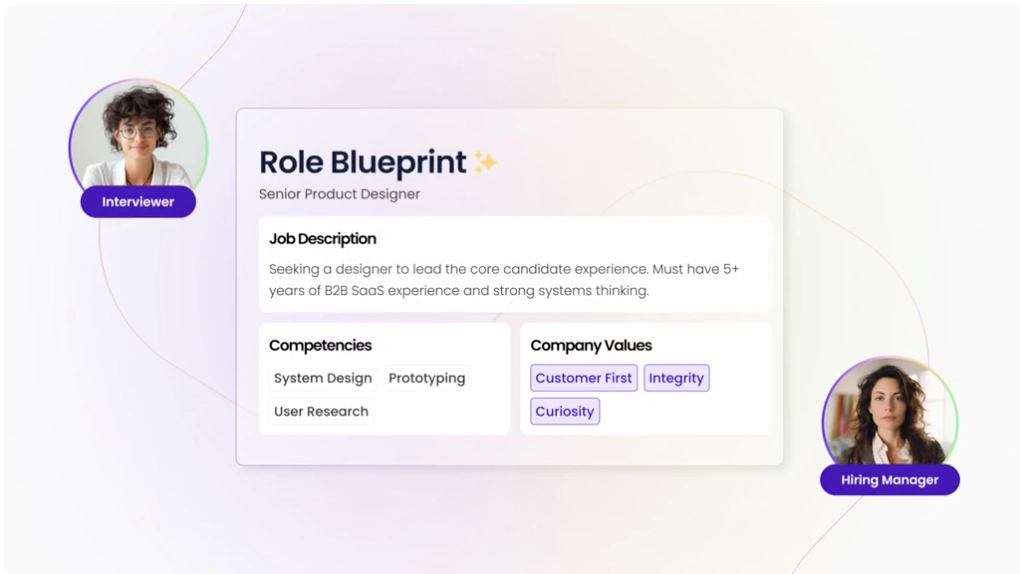
Willo's Interview Question Generator can help you with this. It helps you create role-relevant interview questions based on what you actually need to evaluate. Instead of starting with generic questions, you can build a screening process around the skills and qualities that matter for the role.
The 9 Practical Steps to Writing a Job Description Candidates Understand
The following process helps you use AI as a drafting partner while keeping the important decisions in human hands:
- Gather the real job details before prompting AI
- Separate must-have skills from nice-to-haves
- Write a specific, detailed prompt
- Use negative instructions to avoid AI clichés
- Ask AI to draft in your company’s voice
- Fact-check every responsibility and requirement
- Rewrite the opening line
- Add the details only a human can provide
- Review for inclusive, bias-free language before publishing
1. Gather the Real Job Details Before Prompting AI
Before opening ChatGPT or an AI job description generator, get clear on what you're actually hiring for.
Start with the job itself, not the wording:
- What will this person be responsible for?
- What does success look like after six or 12 months?
- Which tools will they use?
- Who will they work with?
- What problems will they be expected to solve?
Indeed's job-analysis approach recommends thinking about what success looks like in the role and identifying the essential tools and skills required. That information gives AI something useful to work from.
This is actually important because AI can't fill an information gap with real knowledge about your company. If you don't tell it that the project manager will coordinate five product teams and work with enterprise customers, AI has to fill the gap. It may invent generic responsibilities instead of reflecting what the person will actually own
Here’s a list of 8 specific job details you should have before prompting:
- The role's core responsibilities
- The outcomes the person is expected to achieve
- Must-have skills and experience
- Tools or systems they'll use
- Reporting structure and key collaborators
- Working arrangements, location, and schedule
- Salary or benefits information you can disclose
- Details that make the role different from similar positions
The more useful context you provide upfront, the less cleanup you'll have to do later.
2. Separate Must-Have Skills From Nice-to-Haves
One of the easiest ways to make a job description confusing is to turn every desirable trait into a requirement.
A candidate sees a list containing five years of experience, leadership experience, and a dozen “strongly preferred” skills. They now have to figure out which requirements actually matter.
Separate your criteria before asking AI to write the posting.
- Must-haves are requirements someone genuinely needs to perform the job.
- Nice-to-haves are useful qualifications that could make a candidate stronger but shouldn't automatically disqualify someone who doesn't have them.
For example, a content marketing role might require experience creating B2B content and working with SEO tools. Experience with a particular CMS could be a nice-to-have if the person can learn it quickly.
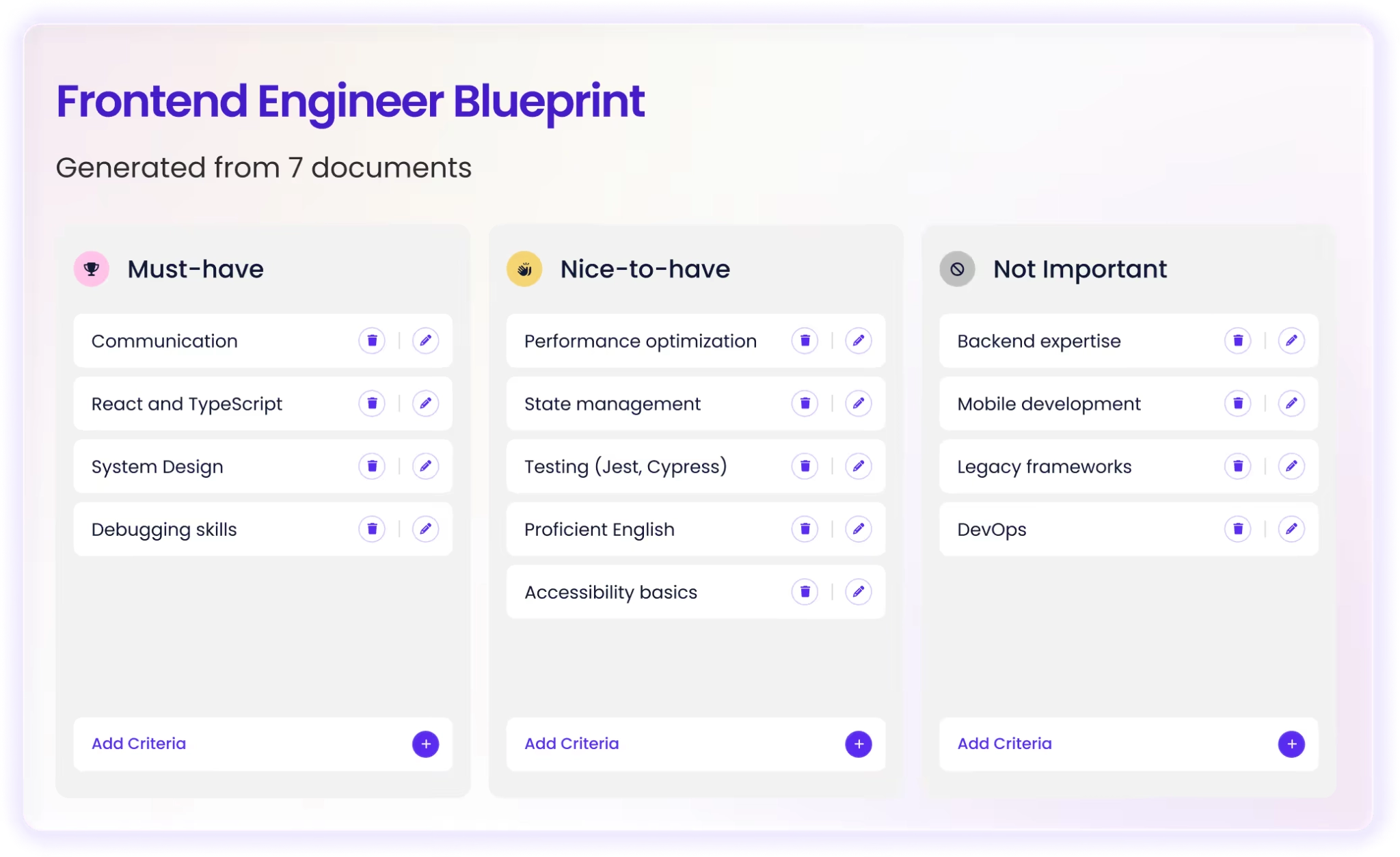
This distinction also helps candidates self-select.
If everything is presented as essential, qualified people may assume they're not a fit and leave the page. That matters when 78% of workers say they would abandon a vague job posting.
Give AI a clear hierarchy of requirements and ask it to reflect that hierarchy in the final job description. Don't let it turn every item in your notes into a mandatory qualification.
3. Write a Specific, Detailed Prompt, Not a One-Line Request
Now you have the information AI needs. Don't throw all of it into a one-line request and hope for the best.
Compare the two prompt examples below:
With:
The second prompt gives the AI enough context to make meaningful decisions about what to include and how to present it.
You can also build the prompt in stages. Start with the role and hiring criteria, then add your audience, company context, tone, formatting requirements, and restrictions.
The aim is to remove as much ambiguity as possible before the AI starts writing.
4. Use Negative Instructions to Kill AI Clichés
Even a detailed prompt can produce familiar AI generated language if you don't tell the tool what to avoid.
This is where negative instructions help.
Instead of only saying, “Write a compelling job description,” tell the AI what not to do.
Something like:
You don't need to create a giant blacklist of every phrase you've ever seen on LinkedIn. Focus on the patterns that make the posting sound interchangeable with hundreds of others.
You can also tell the AI to flag vague language instead of silently rewriting it. For example, ask it to identify claims such as “excellent communication skills” and suggest a more specific description of what that means in the role.
This changes the AI's job from simply making the posting sound polished to helping you make it more precise.
And that's what you should aim for because a good AI-generated job description shouldn't just sound professional. A candidate should be able to read it and understand what they would actually be doing, what success looks like, and whether the role is right for them.
5. Ask Your AI Tool to Draft in Your Company's Voice
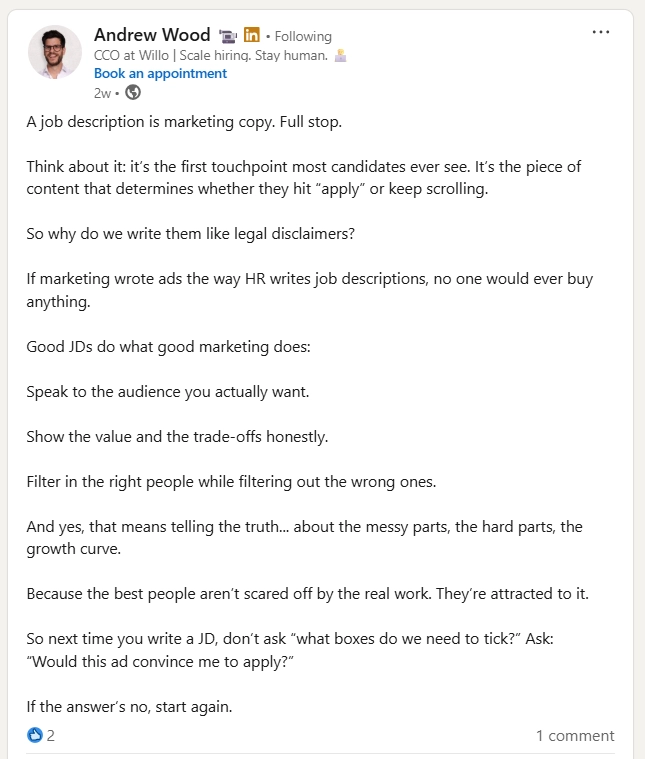
Once the content is specific, make sure it sounds like your company. According to Andrew Wood, your job description should read more like marketing copy. It should give candidates a feel for the company, its culture, and who they’ll be working with. That’s difficult to achieve when AI has no context about your company’s communication style.
Give the tool examples of how your company normally communicates. You could provide copy from your website, careers page, or previous job descriptions and ask AI to identify the tone before drafting.
This gives the AI a reference point instead of asking it to invent a voice from scratch.
But don't let “brand voice” become an excuse for vague language. Your job description should sound like your company and still tell candidates exactly what they need to know.
AI can help you get closer to a consistent voice, but the final review still needs a human touch. You know whether the language actually sounds like your company, and whether it reflects what candidates will experience after they join.
6. Fact-Check Every Responsibility and Requirement the AI Invents
AI can make a job description sound convincing even when parts of it aren't true.
Give it a general description of a role, and it may add responsibilities, qualifications, or benefits that seem reasonable because they're common for similar positions.
That's a problem if candidates take those details literally.
Read every responsibility and requirement against the actual role:
- Does the person really need that certification?
- Will they actually manage a team?
- Is that software part of the tech stack?
- Is the company really offering the benefit AI mentioned?
Indeed recommends checking AI-generated job descriptions for factual accuracy before publishing them. Treat that as a final quality-control step (not an optional edit).
It can also help to ask AI to separate provided information from anything it inferred:
That gives you another layer of protection against plausible-sounding fiction.
The rule is simple: AI can draft the description, but you own the facts.
7. Rewrite the Opening Line So It Doesn't Sound Like Every Other Posting
The first few lines have one job: help the right candidate understand what they're looking at.
They don't need to be clever, they just shouldn't waste the opportunity on generic filler.
Compare:
With:
The second version immediately tells candidates what they would be responsible for and what they would actually work on. That makes it more specific than phrases like “we are seeking” or “join our dynamic team,” which could describe almost any company hiring for almost any position.
You can also ask AI for three to five opening options, then choose or rewrite the one that best reflects the actual role.
You can even give it a rule:
A strong opening needs to help the right candidates recognize why they should keep reading.
8. Add the Details Only a Human Can Provide
AI can summarize a role, but it can't know what it's actually like to work on your team unless you tell it.
This is where you should add the details that make the job description feel real.
- What project will the new hire work on first?
- Who will they collaborate with every week?
- What does a normal week look like?
- What makes the team different?
- What has someone in this role achieved before?
- What would make the first six months successful?
Indeed also recommends personalizing job descriptions with company culture and other information that helps candidates understand the employer.
Don't settle for:
“You'll work in a collaborative, fast-paced environment.”
Explain what that actually means:
“You'll join a six-person product team, work directly with the Head of Product, and meet with engineering every Monday to review what's moving toward launch.”
The second description gives candidates something they can picture.
You can ask AI to help organize these details, but the details themselves should come from people who know the company and the role.
That human context is often what separates a useful AI-assisted job description from one that could have been copied from another company's careers page.
9. Review for Inclusive, Bias-Free Language Before You Post
Your final review shouldn't only look for grammar and spelling. Check whether the language could unnecessarily discourage qualified candidates from applying.
AI tools learn from existing text, which means they can reproduce patterns found in the material they were trained on. A phrase that sounds normal to an AI tool isn't automatically neutral or inclusive.
Look for unnecessary requirements, gendered language, exclusionary phrases, and descriptions of the “ideal candidate” that go beyond what someone actually needs to succeed.
For example, asking for a “young, energetic professional” introduces an age-related preference that has nothing to do with whether someone can perform the job. Similarly, phrases such as “native English speaker” may exclude candidates when the actual requirement is simply strong written or spoken English.
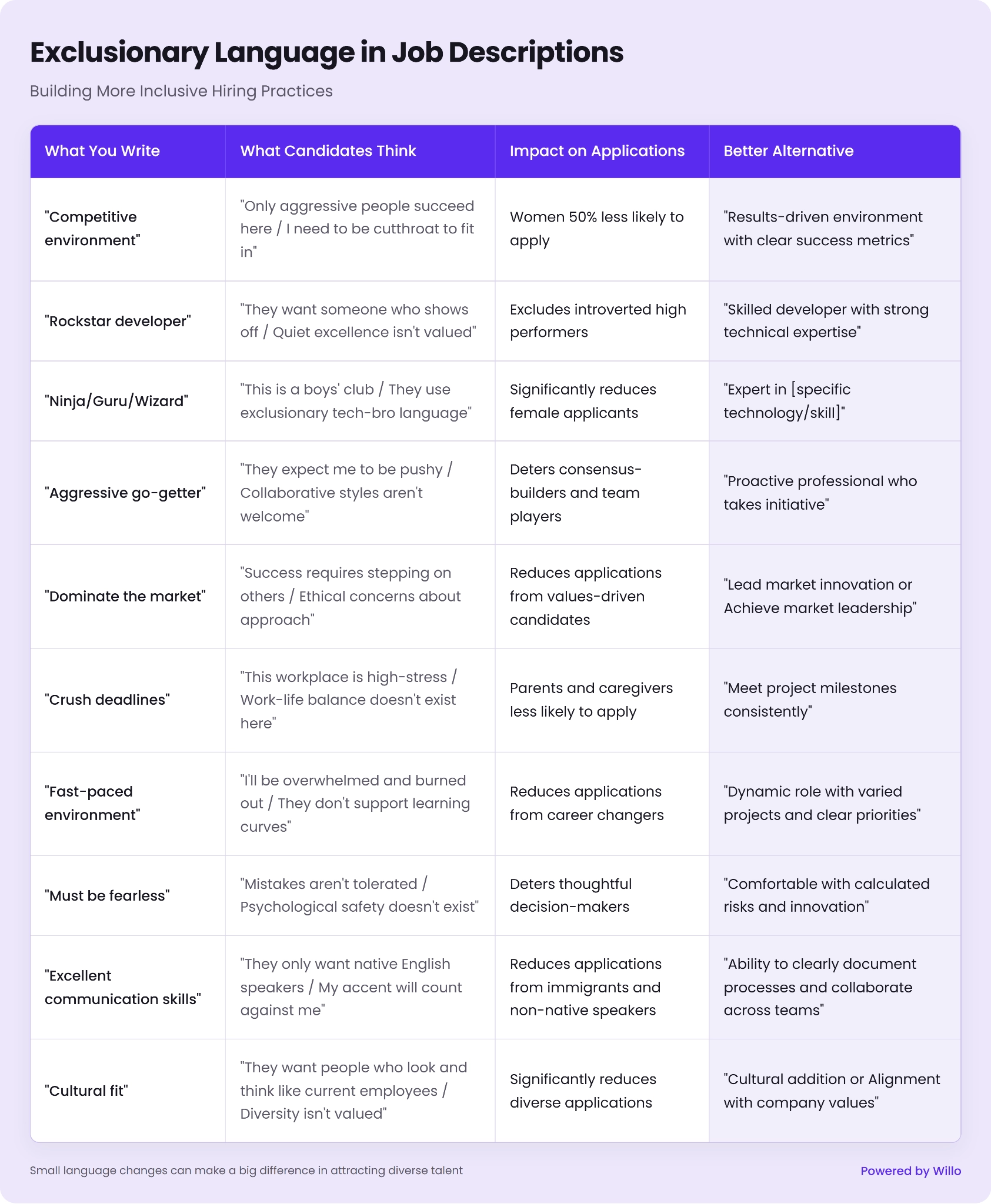
Review the description against the actual requirements of the role. If a qualification isn't necessary for someone to succeed, question why it's there.
You can also ask AI to identify potentially biased or exclusionary language, but don't treat its output as the final decision. Human review still matters.
This is even more important when you're trying to build a structured hiring process. The job description sets expectations before a candidate ever reaches the screening stage, so clarity and consistency should start here.
Before publishing, ask one final question:
If the answer is yes, your AI-assisted draft has done its job.
Want to learn more about bias-free recruitment? Check out our article on inclusive hiring practices. You’ll learn key practices you can implement today to prevent bias in high-volume recruitment.
Should You Just Use a Free AI Job Description Generator Instead of Prompting ChatGPT Yourself?
You don't necessarily need to build a detailed prompt from scratch every time you write a job description.
There are free AI job description generators designed to make the process simpler. Tools from Grammarly, Workable, and QuillBot, for example, can generate a draft after you provide basic information about the role, industry, tone, or other details.
The appeal is obvious: enter a few details, click a button, and you have a job description ready to edit.
For teams hiring regularly, that can save time. It can also be useful when you're staring at a blank page without templates and need a starting point.
But the convenience actually comes with a trade-off.
A dedicated generator still has to work with the information you give it. If you provide only a job title and a few basic details, the output has limited context to work with. The result can be structurally sound while still feeling generic.
That's the same problem candidates are beginning to call out in AI-written job postings. A description can be grammatically polished and packed with familiar hiring language without actually telling someone much about the role.
Treat a generator's output as a first draft, then add the details it can't know: what the person will actually work on, what success looks like, who they'll collaborate with, and what makes your company different.
There's also a bigger limitation to keep in mind.
A free AI job description generator solves the writing problem. It doesn't solve the hiring problem that comes after publishing.
Imagine you use one to create a clear, specific posting and it works. Instead of struggling to attract applicants, you now have 200 people applying.
Then the question changes from:
to:
That's where the screening process becomes just as important as the job description itself.
A faster way to write the posting is useful. But if the resulting application volume still leaves your recruiting team buried in CVs and 30-to-45-minute phone screens, you've only made the first part of the process faster.
The next step is building a better way to evaluate the people your job description attracts.
Writing a Great Job Description Is Only Half the Job. Screening What It Attracts Is the Other Half
A better job description can help the right candidates understand the role and decide whether it is worth applying.
But once applications start coming in, the problem changes.
Now you need to work out which candidates actually meet the requirements, have the right skills, and are worth moving forward. That means having clear criteria for how to shortlist candidates, rather than relying on CVs alone.
If your team is reviewing hundreds of CVs or scheduling 30 to 45-minute phone screens, the bottleneck has simply moved further down the hiring process. This is where structured screening can help.
Instead of relying on CVs alone, you can ask every candidate the same role-relevant questions and collect comparable responses before deciding who moves to the next stage. With an asynchronous screening process, candidates can complete their responses on their own time, while recruiters review them when it suits their schedule.
That is the approach Willo is built around.
You can create a structured assessment based on the role's actual requirements, then invite candidates to respond using video, audio, text, or other question formats. Everyone gets the same core questions and conditions, giving your hiring team a more consistent set of evidence to review.
For example, Toyota GB saved 161 hours by using Willo for candidate screening, and TravelXP reduced screening time per candidate by 66%.
The point here isn't to replace human judgment with AI.
Willo uses AI to make the information recruiters already need easier to work with. Responses can be transcribed and summarized, while Willo Insights helps hiring teams assess responses against the criteria defined for the role. Recruiters can then review the evidence, compare candidates, add their own notes, and decide who should move forward.
The human decision stays with the hiring team.
That distinction matters because a faster screening process is only useful if recruiters can still understand why a candidate is worth progressing. You don't want another black box deciding who gets an interview, you want a clearer way to review the evidence and make the decision yourself.
It also gives candidates more context than a CV alone can provide. A resume can tell you what someone has done. A structured response can show you how they approach a problem, communicate an idea, or think through a situation that is relevant to the role.
That makes screening a natural extension of the job description itself.
The job description explains what you're looking for, while the screening process gives candidates an opportunity to demonstrate it.
The goal is to create a hiring process that gives your team better information at each stage. This way, you can spend less time sorting through noise and more time having meaningful conversations with the candidates who are worth meeting.